以下是一个简单的Python五子棋程序源代码,仅供参考:
- import numpy as np
- import pygame
- import sys
- ROW_NUM = 15
- COL_NUM = 15
- # 棋盘宽度和高度
- BOARD_WIDTH = 450
- BOARD_HEIGHT = 450
- # 点的大小
- POINT_RADIUS = 5
- # 点的颜色
- BLACK = (0, 0, 0)
- WHITE = (255, 255, 255)
- # 棋子颜色
- BLACK_STONE = 1
- WHITE_STONE = 2
- # 棋子半径
- STONE_RADIUS = 20
- # 标记点阵列
- POS = np.zeros((15, 15), dtype=int)
- def init_board():
- board = np.zeros((ROW_NUM, COL_NUM), dtype=int)
- return board
- def draw_board(screen):
- for i in range(ROW_NUM):
- pygame.draw.line(screen, BLACK, [i * 30 + 30, 30], [i * 30 + 30, BOARD_HEIGHT - 30], 2)
- pygame.draw.line(screen, BLACK, [30, i * 30 + 30], [BOARD_WIDTH - 30, i * 30 + 30], 2)
- # 绘制标记点
- pygame.draw.circle(screen, BLACK, [4 * 30 + 30, 4 * 30 + 30], 5, 0)
- pygame.draw.circle(screen, BLACK, [4 * 30 + 30, 10 * 30 + 30], 5, 0)
- pygame.draw.circle(screen, BLACK, [10 * 30 + 30, 4 * 30 + 30], 5, 0)
- pygame.draw.circle(screen, BLACK, [10 * 30 + 30, 10 * 30 + 30], 5, 0)
- def get_input(board, player):
- while True:
- for event in pygame.event.get():
- if event.type == pygame.QUIT:
- sys.exit()
- if event.type == pygame.MOUSEBUTTONDOWN and event.button == 1:
- x, y = event.pos
- row = round((y - 30) / 30)
- col = round((x - 30) / 30)
- if row >= 0 and row < ROW_NUM and col >= 0 and col < COL_NUM and board[row][col] == 0:
- board[row][col] = player
- return row, col
- def check_win(board, player):
- # 横向检查
- for i in range(ROW_NUM):
- for j in range(COL_NUM - 4):
- if board[i][j] == player and board[i][j + 1] == player and board[i][j + 2] == player and \
- board[i][j + 3] == player and board[i][j + 4] == player:
- return True
- # 纵向检查
- for i in range(ROW_NUM - 4):
- for j in range(COL_NUM):
- if board[i][j] == player and board[i + 1][j] == player and board[i + 2][j] == player and \
- board[i + 3][j] == player and board[i + 4][j] == player:
- return True
- # 右上-左下方向检查
- for i in range(4, ROW_NUM):
- for j in range(COL_NUM - 4):
- if board[i][j] == player and board[i - 1][j + 1] == player and board[i - 2][j + 2] == player and \
- board[i - 3][j + 3] == player and board[i - 4][j + 4] == player:
- return True
- # 左上-右下方向检查
- for i in range(ROW_NUM - 4):
- for j in range(COL_NUM - 4):
- if board[i][j] == player and board[i + 1][j + 1] == player and board[i + 2][j + 2] == player and \
- board[i + 3][j + 3] == player and board[i + 4][j + 4]:
- return True
- return False
- def draw_stone(screen, row, col, player):
- x = col * 30 + 30
- y = row * 30 + 30
- color = BLACK_STONE
- if player == WHITE_STONE:
- color = WHITE
- pygame.draw.circle(screen, color, [x, y], STONE_RADIUS, 0)
- def run_game():
- pygame.init()
- screen = pygame.display.set_mode((BOARD_WIDTH, BOARD_HEIGHT))
- pygame.display.set_caption("五子棋")
- board = init_board()
- player = BLACK_STONE
- font = pygame.font.Font(None, 24)
- text = font.render("轮到黑方", True, BLACK, WHITE)
- text_rect = text.get_rect()
- text_rect.centerx = screen.get_rect().centerx
- screen.blit(text, text_rect)
- draw_board(screen)
- pygame.display.flip()
- while True:
- row, col = get_input(board, player)
- draw_stone(screen, row, col, player)
- pygame.display.flip()
- if check_win(board, player):
- font = pygame.font.Font(None, 48)
- text = font.render("黑方获胜" if player == BLACK_STONE else "白方获胜", True, BLACK, WHITE)
- text_rect = text.get_rect()
- text_rect.centerx = screen.get_rect().centerx
- text_rect.centery = screen.get_rect().centery
- screen.blit(text, text_rect)
- pygame.display.flip()
- break
- # 切换玩家
- player = WHITE_STONE if player == BLACK_STONE else BLACK_STONE
- text = font.render("轮到白方" if player == WHITE_STONE else "轮到黑方", True, BLACK, WHITE)
- text_rect = text.get_rect()
- text_rect.centerx = screen.get_rect().centerx
- screen.blit(text, text_rect)
- pygame.display.flip()
- while True:
- for event in pygame.event.get():
- if event.type == pygame.QUIT:
- sys.exit()
- if __name__ == '__main__':
- run_game()
这段代码实现了一个简单的五子棋游戏,使用了Pygame库来进行图形化展示。在游戏中,黑方先手,轮流落子,先连成五个子的一方获胜。
以上内容来自 ChatGPT 3.5turbo,如需继续对话,则在此回答下“点击回复” 或者 在提问时 “@机器人”!禁止 "黄赌毒及政治敏感",违者封号,严重者 提交 网警公安部门。本站不对内容真实性负责,chatGPT有时候会乱说一通…… |
 共31章节675课时
 共30章节677课时
 共4章节48课时
 共0章节18课时
 共6章节90课时
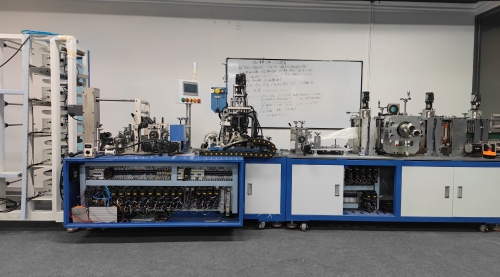 共8章节213课时
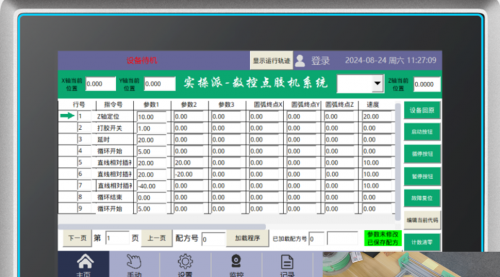 共7章节98课时
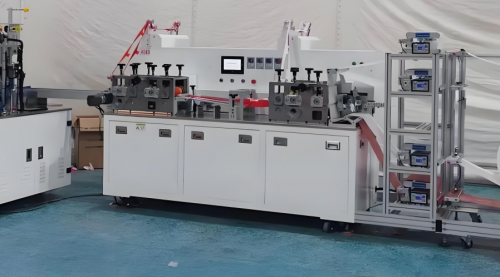 共8章节144课时
 共9章节44课时
 共6章节52课时